A long time ago, I wanted to write a blog (cough cough) and the topic I had in mind at that time was about keyboard layouts (I didn’t even know about custom keyboards, lucky me).
So, some background: I picked up programming relatively late, using the layout coming out of the box on my country (where you need a combo using Alt-Gr to insert brackets or braces just to pick an example).
… Just giving you some time to locate the Alt-Gr key on your keyboard (or remind you that you may need it on your fancy custom layout) …
Shortly after, I joined the university, where I switched to a qwerty layout, not to be cool but only because the keyboards we had there where qwerty labeled and… I was not able to touch type (it’s a skill I tried to pick up in panic days before the university thinking everyone would be able to, but had just broken basics, and anyway surounded by many people in the same situation).
Fun fact, when possible, I tried to pick up one of the very few non-qwerty labeled keyboards in the university, because nearly every single keyboard had broken feet but non-qwerty keyboards where deserted so, with feet, always. As touch typing slowly became a thing, this was really nice.
A failure I made and still can’t properly fix it: I remapped the backspace key on the capslock, easily reachable… allowing much more typos. I unfortunately still have a far too reachable capslock.
Later on, after years of programming for a living, it pissed me off to not be able to cleanly touch type, and as some colleagues transited to dvorak or colemark, I was motivated to follow but wondered what would be the state of the art layout.
Not-so-quick tries and errors and extensive search lead me to the holly workman layout (Wayback machine link)
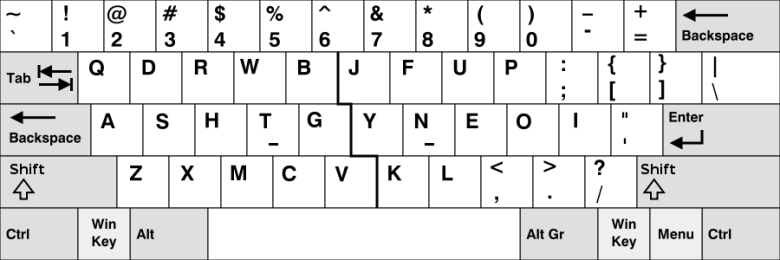
OJ Bucao, its creator holds a long and understandable description why where other layouts not that practical and overall, he measured not the travel distance of your fingers to reach a random key, but the cost of reaching keys to make digraphs (compare extending your index Vs your pinky for instance and typing ‘th’ Vs typing ‘ue’: which bigram is more useful in english; On this post draft: 1 match for ‘ue’ but 29 matches for ‘th’).
This layout came with bonuses:
- Nearly no cheating possibility. You need to touch type (it still breaks my brain to have a look at keyboard labels while typing).
- The slight strain I had in my wrists calmed down for a while.
WARNING
Do seek professional medical advice, do not read a blog for medical issues.
To be fair, the workman layout comes with some drawbacks:
- Your editor bindings / muscle memory are off.
- The Ctrl-c / Ctrl-v mainstream shortcuts are off-by-one.
- Using this layout makes you an alien in random companies (if you already experienced being the only non Windows user in a whole department, this is worse).
- Gaming is painful as you need to remap everything… if you’re using a normal keyboard.
In general, learning a layout is hard. If the layout is really good, it’s definitely worth it, even if you’re only writing AI prompts ;)
Fun facts
Learning the workman programmer variant is still on my list
(and writing this article re-motivates me to attempt a transition).
I contaminated one person so far with the holly workman layout, will you be the next one?
Writing this blog post was my oldest ticket.